Qtrace Installation
The qtrace scanner helps you identify cryptographic assets and assess their quantum-readiness directly from your repository.
For most installations, you only need to:
- Install the scanner.
curl -fsSL https://qtrace.quant0.io/v0.1.0/install.sh | sh
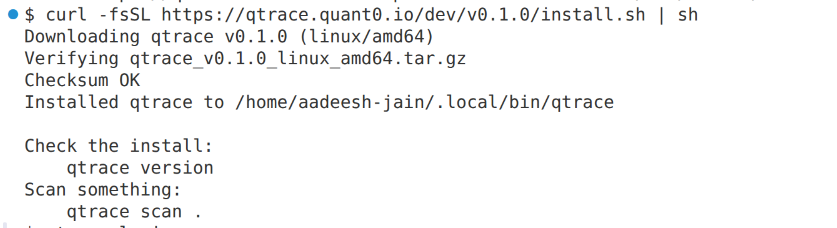
- Sign in once on your machine.
- Connect your repository.
- Run a scan.
Prerequisites
Before using qtrace make sure you have:
- A Quant0 account or organization if you don't have account then sign up to the organization first.
- A repository you want to scan.
- Permission to connect the repository to Quant0.
Install the Scanner
The installer verifies every archive against SHA256SUMS before unpacking anything or marking it executable.
It also refuses plain HTTP connections to anything other than localhost.
The installation uses a pinned version:
v0.1.0
The version is pinned intentionally so that the scanner version used for a scan can always be identified.
After installation, verify the installed version:
qtrace version
Sign In
Sign in once for each machine where you use qtrace.
qtrace login
A verification code appears in your terminal. Approve the request in the Quant0 portal after confirming which machine is requesting access.
Sign In Once
You only need to sign in once per machine.
The credential is stored in your user configuration directory rather than inside the repository.
This means multiple repositories on the same machine can use the same authenticated session.
If you clone another repository and run:
qtrace setup
you do not need to sign in again.
Running qtrace login again will indicate that you are already signed in.
Connect a Repository
Run the setup command from inside the repository:
qtrace setup
This creates:
.qtrace/config.json
Commit this file to your repository so that everyone working on the project uses the same Quant0 project configuration.
The configuration file does not contain secrets.
Scan current Repository
Run the scanner from inside the connected repository:
qtrace scan .
The scan analyzes the repository for cryptographic assets and reports the results in the Quant0 portal.
Results are typically available within a few seconds.
Source Code Privacy
Your source code does not leave your machine during the scan.
Only metadata required for the analysis is sent, such as:
- Cryptographic algorithm names
- File paths
- Line numbers
Typical Workflow
A typical first-time setup looks like this:
qtrace version
qtrace login
qtrace setup
Commit the generated configuration:
.qtrace/config.json
Then run the scan:
qtrace scan .
Review the results in the Quant0 portal.
Security Considerations
When using qtrace:
- Keep your authentication credentials private.
- Commit
.qtrace/config.jsonso the repository uses a shared project configuration. - Use the intended Quant0 API URL for your environment.
- Review scan results in the Quant0 portal after each scan.